
Amend - A small revision control system for classic Mac OS
Amend is a self-contained revision control system that I wrote to keep track of source code changes while working on other programming projects on my Macintosh Plus. It is written on and for System 6, and lightly tested on System 7+.
AmendHub is a site for sharing Amend repositories and browsing amendments made to them.
Amend is free software. I also have some videos about its development and C programming on System 6 in general.

Latest Update: Amend 4.0 Released (2026-10-19)
Amend 4.0 has been released:
- amend-4.0.sit
(StuffIt 3 archive, includes
source code
and THINK C 5 project file)
SHA256:c838ee34931c00c03869affe7f9d6b85 c0bbc51dd1242d11 e8682a3774fdd0e3
SHA1:040059d0b3302f1bd6ec0207b9a2f12d ccdda374
Changes in this version:
- New repository format that tracks author e-mail in addition to name; existing repositories are migrated automatically on open
- Add inregrated resource file support;
.rsrcfiles can be added directly to a repo and files are converted to DeRez-style ASCII output before diffing, so running SADerez to produce separate.rfiles on every change is no longer required - Allow Command+. to cancel loading a repo
- Allow Command+. to cancel diffing; if diff text has already been output it will remain available, otherwise the window will be closed
- Center settings dialog, make sure author name is present
- Use database transactions to avoid leaving repository database files in a partially-committed state if we crash
- Numerous bug fixes
Previous Updates
-
Amend 3.7.1 Released (2023-04-18)
-
Amend 3.6 Released (2022-09-12)
-
Amend 3.5 Released (2022-08-17)
-
Amend 3.4 Released (2022-06-15)
-
Amend 3.3 Released (2022-06-03)
-
Amend 3.2 Released (2022-02-03)
Source Code
Source code and its THINK C project file are contained in the latest release archive, or it can be viewed on AmendHub.
Screenshots
Repository Browser
Each project handled by Amend is contained in a single repository database file.
A .repo file must currently reside in the same directory as the files it is
managing.
When starting Amend without having double-clicked a repository from the Finder,
one is prompted to choose a file.
To create a new repository, cancel out of the Open dialog and choose Repo
-> New Repo.
Once a repository has been opened, the main browser interface of Amend is displayed:
On the left are the list of files; each file being managed must be added through the Repo -> Add to Repo menu option. In this dialog, files outside of the repository's directory and files that already exist in the repository are hidden.
On the top right are a list of amendments. As files are selected on the left, the list of amendments is narrowed down to only those that included the selected files.
Once an amendment has been selected, the author, date, log message, and unified diff text are shown in the bottom section.
Amending
After selecting one or more files, or leaving the default "[All Files]" selected, clicking Generate Diff will bring up the diff/commit window. As each selected file is compared to the previous version stored in the repository and found to be differing, a unified context diff is appended to the text box on the bottom.
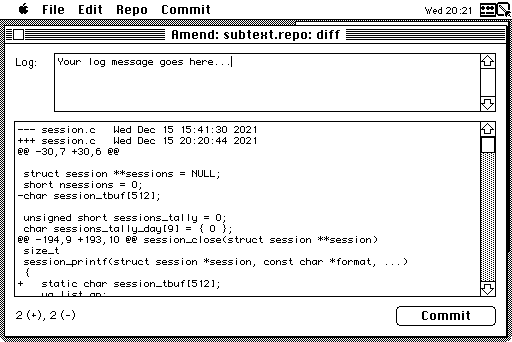
Once diffing is complete, a log message must be entered and then the Commit button can be clicked. Each differing file's contents are updated in the repository and the amendment timestamp, author, date, and diff text are stored. The diff/amend window is closed and the list of amendments in the browser is updated.
Settings
The author name and e-mail used for new amendments, as well as the tab width can be adjusted in the Settings menu. These are global options stored in a preferences file in the System folder, and are not unique per-repository since repository databases can be shared.