What I Use
I get asked quite a bit about the tools I use for certain tasks, what things are running in a screenshot, or what laptop I recommend to others. Although most of what's here are not recommendations, I'll try to keep this page up to date with what I'm currently using.

Table of Contents
Primary Workstation
My primary workstation is a
Lenovo ThinkPad X1 Nano (Gen 1)
laptop with an Intel i7-1160G7 processor, 16 GB of RAM, and a
512 GB 2TB SSD.
I purchased this particular example in early 2023 after the Gen 2 model came
out and the Gen 1 models still in stock were heavily discounted.
I run it
fanless
most of the time because I do not like fan noise.
It has an
internal USB port
that houses a
Bolt Receiver
for my
Logitech Pebble M355
Logitech POP Mouse.
I switched from the Pebble to the POP because the wheel on the Pebble rattles
when scrolling quickly, and the POP is completely silent.
Unfortunately it required purchasing a separate Bolt receiver and the pairing
has to be done under Windows, but once paired, it works fine under OpenBSD.
The center button on the mouse in front of the wheel sends a button 6 event
which conveniently works with
tpadnav
to generate a back key press, causing Firefox to navigate back when pressed.
Aside from the internal USB port, I customized it with Dolch colors instead of the traditional red. Creative BT-W3 (article) to route audio to my AirPods.
-
Operating System: OpenBSD-current
I run a custom branch that follows-currentwith some local changes and in-development drivers. -
Editor: Vim
I use a monochromatic color scheme and just a few plugins to keep it light. -
Web Browser: Firefox
I've been using Mozilla browsers since Netscape Navigator (back when OpenBSD had to run a BSDi binary-emulated version). I especially like using it these days because I switch between macOS and OpenBSD frequently and I like having all of my settings, bookmarks, and add-ons synced between both environments.A few
about:configsettings that I change for OpenBSD:alerts.useSystemBackend: falseto use Firefox's native notifications rather thanlibnotify, so I don't have to run a separate daemongeneral.autoScroll: trueto enable automated scrolling after a middle mouse button clicklayout.css.devPixelsPerPx: 1.5to render things larger on my laptop's screen, and enable 2x assets on websites that support them (like this one)mousewheel.default.delta_multiplier_y: 50 ui.key.accelKey: 91to use Super as the primary UI keyboard shortcut modifier, rather than Control (for similar muscle memory with the Command key on a Mac)ui.key.meuAccessKeyFocuses: falseto stop random Alt presses from bringing up the menuwidget.non-native-theme.scrollbar.style: 4andwidget.non-native-theme.scrollbar.size.override: 12to make the scrollbars thicker
I use a few add-ons, though some are just to restore functionality that used to be included in Firefox:
- Awesome RSS just to get the RSS icon back in the address bar for websites that support it
- Bitwarden
- Cookie AutoDelete is my most critical add-on; I whitelist only the websites that I actively login to and all other websites have their cookies and other junk deleted automatically when the tab closes.
- I still don't care about cookies
- Stylus to fix the UI of a few websites
- uBlock Origin
- Vimium-FF
mostly just for hit-a-hint and
j/k/G/ggscrolling
-
E-Mail Client: Mutt
I've been a happy Mutt user for decades now, and I can't see myself ever switching to anything else, especially for dealing with mailing lists. It works great with Fastmail's IMAP server and it uses msmtp for sending. -
X11 Window Manager: progman
A lightweight window manager I created that looks like Windows 3.1. I was using my fork of the Ratpoison tiling window manager, sdorfehs, for many years but I grew tired of having to live with everything inside frames all the time. I now embrace the chaos of having lots of partially-overlapping terminals all over the screen. -
Miscellaneous Programs
- Redshift to shift the color temperature at night
- slock with DPMS functionality added so that it turns the screen off while locked
- tpadnav to enable two-finger left and right swiping on the touchpad to navigate back and forward in Firefox
- xbanish to hide the mouse cursor when typing
- xbatticon, xcalicon, and xweathericon for desktop widgets
- xcalib to load a color calibration profile for my laptop generated from a Spyder X colorimeter
- xdimmer to automatically turn off the keyboard backlight after a short period, and re-enable it when typing again
Work Programming Workstation
For
work
programming and other Mac-specific things, I use an
Apple Mac Mini (2024)
with an 10-core M4 processor, 24 GB of RAM, and a 2 TB SSD.
It is housed in an
iMac G4
with a 4K 17" screen.
I use
Synergy
Deskflow
so I can move the mouse cursor up to the top of my ThinkPad screen and it
appears on the Mac Mini where I can start typing, and vice versa.
I use Xcode for iOS and Android Studio for Android development. I hate both of them.
Workspace
In my office, I sit in a
Steelcase Gesture
Steelcase Leap with headrest
chair at a
GeekDesk Max
adjustable height desk with a "carbonized bamboo" top.
I don't recommend this desk top as it is very soft and has many scratches and
gouges in it from just a couple years' use.
Personal Technology
Not specific to one of my main computers, I have a few pieces of technology that are in frequent use:
-
Fastmail
After decades of running my own e-mail servers and getting fed up with the arms race of dealing with spam, I switched to Fastmail for hosting my e-mail, calendars, and contacts a few years ago. I've been a very happy customer and their IMAP and SMTP service works great with Mutt, and their web interface for calendars and occasional e-mail is very lightweight. -
Bitwarden
Once 1Password discontinued its HTML export that I used to access my passwords on OpenBSD, I switched to Bitwarden for password management. It allows me to synchronize my passwords between my OpenBSD laptop (Firefox), my Mac laptop (dedicated macOS client), and my iPhone (iOS app and password filling extension). I ran my own server implementation for a while, but I gave up trying to keep pace with the upstream clients and server. -
Apple iPhone 13 Mini
The last of the small iPhones, I actually bought another one in 2025 just to have a fresh model with a new battery and no scratches. I'm not a big app user and prefer to use things in a web browser when I can, but here are a few apps on my home screen:- Bitwarden for password management; I miss 1Password's polished UI though
- Bluesky for… Bluesky
- Home Assistant for controlling the Z-wave things in my house
- OTP Auth for all those OTP codes; importantly it offers encrypted export/backups
- Plexamp for listening to my music stored on my Plex server at home so I no longer have to carry it all on my phone
- Pocket Casts which I've been using since my Android days
- Prompt 2 for SSHing to my servers on the go
- Pushover for push notifications
- Tailscale for secure remote access for Prompt to reach my servers
-
Apple AirPods Pro (3nd Generation)
I listen to a lot of podcasts and music, and I use these at least a couple hours every day. The noise cancellation is great in loud public places, and the transparency mode is useful when wearing them at home when I still need to hear what's going on. I often just have one AirPod in, listening to a podcast while I do stuff. When the battery gets low, I can just switch to the other ear's AirPod while that one charges.My most recent pairs have been painted black by ColorWare, with black silicone ear tips.
-
Pushover
Obviously I use Pushover a lot on my devices and have it integrated into a number of things like my IRC client and cron jobs, though sadly I can't use many of its features for monitoring my own servers because those servers operate Pushover itself. -
Tailscale
I use Tailscale on all of my servers and (modern) workstations. It's great not having to deal with IPsec or running SSH on a hidden port, and being able to securely connect to any of my servers remotely when I need to. I can also use it to connect to unencrypted things on my other servers like Deskflow or MySQL without having to configure application-level encryption. -
rsync.net
All of my dedicated servers around the country backup to rsync.net. -
Syncthing
I run this on my laptops and my file server as a way to keep my music, photos, and documents synced and backed up. -
Plex
I run Plex on the main Mac Mini file server in my office which hosts all of my movies and TV shows, as well as my music collection that I can play remotely through Plexamp on my phone. The Mac on my desk is most often playing some kind of media from my Plex server. -
Amazon Kindle Scribe (1st Generation)
My preferred book- and PDF-reading device, which I now use quite extensively for note taking and idea sketching while programming. I had to jailbreak it to get custom sleep covers.
Network
I used to have a whole rack of equipment in my basement, but these days my network footprint is much smaller and quieter.
-
Router/Firewall
My main router and firewall is aProtectli FW6Protectli VP4650 mini fanless server with an Intel Core i5 and sixgigabit2.5GB ethernet ports running OpenBSD. It uses VLANs on most of the ports to segment my network, and connects to AT&T U-Verse for internet access over symmetrical gigabit fiber.It runs Asterisk to connect the various telecom equipment in my office to Twilio SIP trunks, such as my Western Electric 1D2 payphone and modems.
-
Networking
I finally gave up my beloved Apple Airport Extreme Wi-Fi base stations and switched everything to UniFi APs, switches, and cameras once I got fed up with wireless, battery-powered cameras. The batteries never lasted as long as they claimed and there was a long delay between motion being detected and them waking up to start recording.I use a UniFi Flex 2.5G switch in the basement to connect to the router and fan out to other things. A UniFi Ultra 210W switch provides PoE power and ethernet to my wired cameras around the house, which feed video back to a UniFi CloudKey+ with an 8 TB SSD to store recordings and act as the network controller for everything. Another UniFi Flex 2.5G switch in my office is wired up to a UniFi Flex Mini 2.5G switch in the attic, which is then wired back down to the basement, providing 2.5GB ethernet on all levels of the house.
A UniFi U7 Pro Wi-Fi access point upstairs is wired into the attic switch, a UniFi U7 Lite on the main floor is connected to a UniFi Flex Mini 2.5G that is wired down to the basement, and a UniFi U6 Pro is pointed towards the garage.
Various UniFi G6 Bullet cameras around the house are wired into the basement PoE switch, and a UniFi G5 Turret Ultra camera in the garage is connected to a UniFi Device Bridge Pro.
A Grandstream HT814 4-port ATA routes VoIP traffic between my BBS modem and my Asterisk server.
-
jcs.org server
Previously this website ran on a dedicated server hosted at Vultr, but now that I have gigabit fiber and static IP addresses at home, I moved it to an old Apple Mac Mini (2012) with an Intel Core i5-3210M, 16 GB of RAM, and a Samsung 850 500 GB SSD. The Mac Mini runs OpenBSD, and operates silently on my desk. -
BBS Server
Kludge BBS used to run on a dedicated Macintosh Plus located next to my desk, with 4 MB of RAM, a Dayna DaynaPort SCSI/Link-3 ethernet adapter and a US Robotics 56k modem in the case of an old Apple 300/1200 modem. Eventually hardware problems caused me weeks of frustration and now the BBS runs on a virtual Macintosh Plus with 4MB of RAM in the pce emulator, hosted on a Raspberry Pi 5 installed in a G5-like case, with a US Robotics USB modem connected through to pce.It runs my Subtext BBS Server on System 6.0.8.
-
Home Assistant YellowHome Assistant
I have a handful of Z-Wave light switches and sensors in the house and usea dedicated Home Assistant Yellow deviceHome Assistant on my Mac Mini server for controlling everything. The software is pretty terrible, but the Indigo Domotics software that I previously used and had to pay hundreds of dollars a year to keep upgrading was not much better. -
Brother DCP-7065DN Printer
I've had this printer/scanner for over a decade now and it's still rock solid. It doesn't have any of the vendor lock-in like HP printers, and it connects to my network with good old ethernet (though I have it connected to a UniFi Device Bridge to connect it to Wi-Fi). I print to it from OpenBSD with CUPS and the brlaser driver which takes all of 30 seconds to setup when I get a new machine. I can also print to it from my old Macintoshes through Netatalk's CUPS integration. -
Brother QL1110NWB Label Printer
I got this to print shipping labels and it works from OpenBSD via AirPrint with CUPS's driverless… driver. -
File Server
An Apple Mac Mini (M1) primarily handles Time Machine backups from Macs and Restic/SSH backups from OpenBSD machines. It also uses osxphotos to keep a local directory synced with all of my photos from iCloud, that is then exported through Syncthing so they show up automatically on my OpenBSD laptop shortly after I take photos on my iPhone.It also hosts a small Linux VM in VMWare Fusion that runs Netatalk 2 for my classic Macs to be able to copy files around, and serves as a bridge between SMB on my new Mac and AppleTalk on the old Macs.
It previously had 2 USB spinning hard drives for backups but since SSD prices came down, I replaced them with two 8 TB NVMe SSDs in an OWC Express 4M2 Thunderbolt enclosure to be able to operate silently, which allowed me to move it up to my desk.
Workbench
After burning two small holes in my main desk with a mini spot welder, I decided to make a dedicated workbench in my office for soldering and taking things apart. Because it had to fit in a rather particular space, I made a table from a large cutting board attached to two square legs with a drawer.
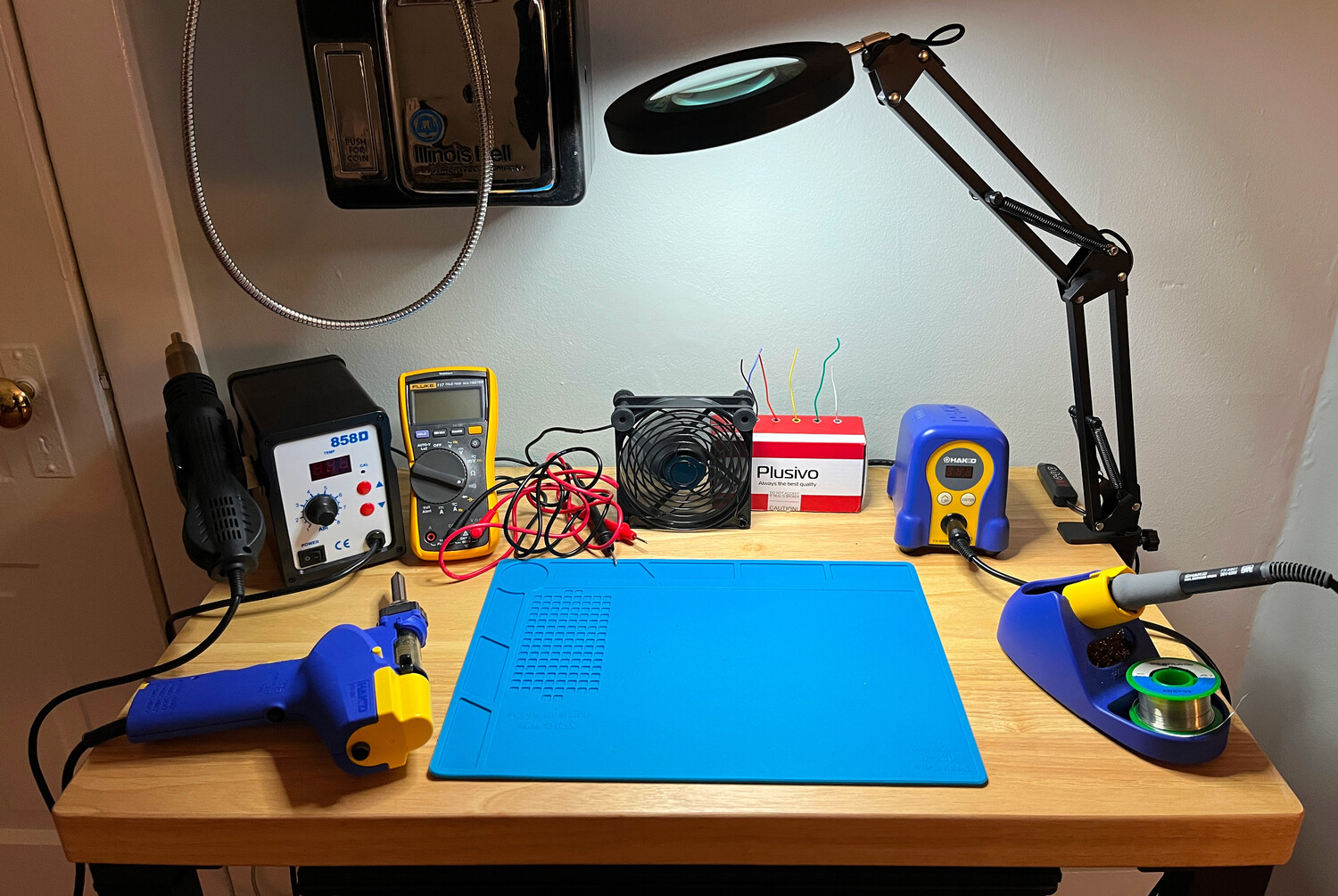
Clockwise from bottom left, these tools that I am not qualified to use are:
a
Hakko FR301
desoldering gun, a
generic hot air station,
a
Fluke 117
multimeter, a
USB fan
with adjustable speed,
wire,
a
Hakko FX888D
soldering station,
and a
generic magnifying glass and lamp
(different) generic magnifying glass and lamp.
The workspace is never this clean and usually has random components and tools
all over it.
Not pictured is my
Prusa i3 MK3S+ 3D Printer
Prusa MK4 3D Printer
Prusa XL 3D Printer
located in the closet behind my desk chair.